Ethernet vs WiFi Gaming Performance Optimization: Which Connection Delivers Better Results
Discover the real performance differences between Ethernet and WiFi for gaming, including latency comparisons, stability factors, and optimization techniques for both connection types.
Ethernet vs WiFi Gaming Performance Optimization: Which Connection Delivers Better Results
The choice between Ethernet and WiFi for gaming performance optimization directly impacts your competitive edge and overall gaming experience. While both connection types can deliver adequate performance for casual gaming, the differences become significant when milliseconds matter in competitive scenarios or when network stability affects your gameplay consistency.
Latency Differences Between Ethernet and WiFi
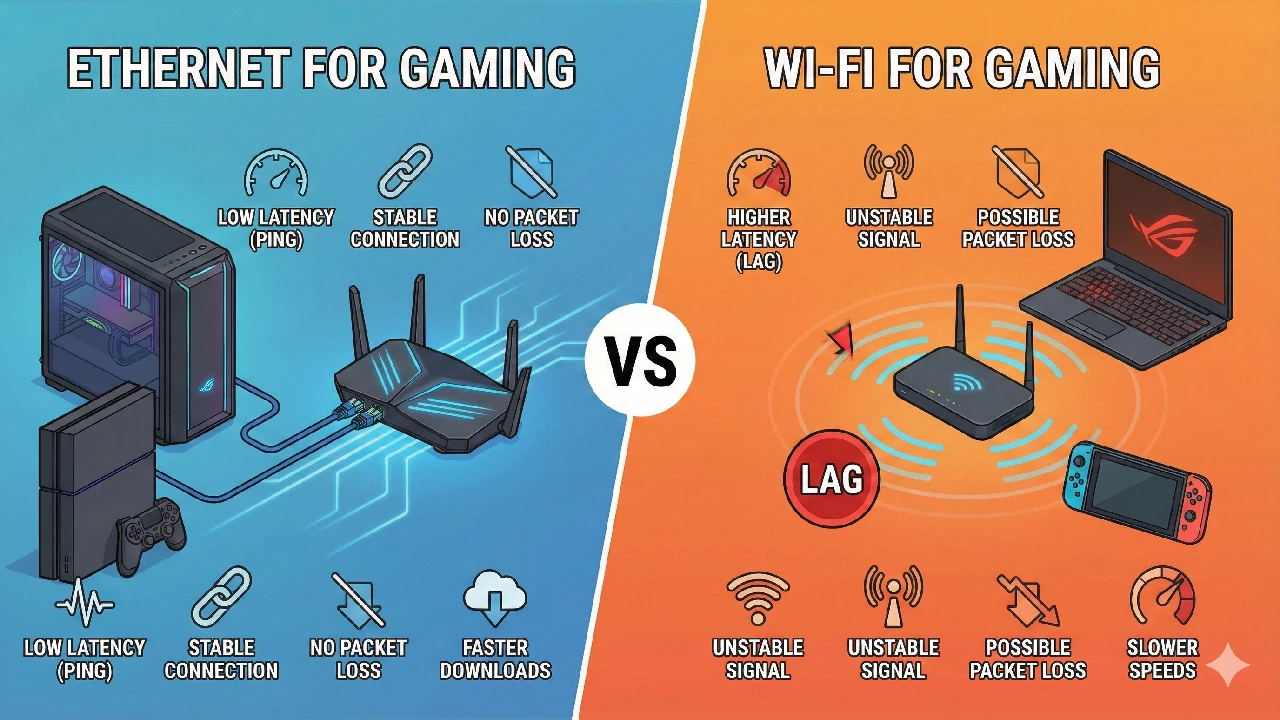
Latency represents the time delay between your input and the server's response. Ethernet connections typically maintain latency between 1-5 milliseconds on local networks, while WiFi connections range from 2-10 milliseconds under optimal conditions. This difference becomes more pronounced during peak usage hours or when interference affects wireless signals.
The consistency of latency matters more than the absolute numbers. Ethernet provides stable, predictable latency that remains constant during gameplay. WiFi latency fluctuates based on signal strength, interference from other devices, and network congestion, creating the dreaded "lag spikes" that can disrupt critical gaming moments.
Test your connection stability by running continuous ping tests to your game servers. Ethernet should show minimal variation (jitter) while WiFi may display irregular spikes indicating connection instability.
Speed and Bandwidth Considerations
Modern Ethernet connections support speeds from 100 Mbps (Fast Ethernet) to 10 Gbps (10 Gigabit Ethernet), with Gigabit Ethernet (1000 Mbps) being standard on most gaming systems. WiFi speeds depend on the wireless standard, with WiFi 6 theoretically reaching 9.6 Gbps and WiFi 5 achieving up to 3.5 Gbps under perfect conditions.
Real-world WiFi performance rarely matches theoretical maximums due to signal degradation, interference, and distance from the router. Most gaming scenarios require 25-50 Mbps for smooth online play, making both connection types adequate for bandwidth requirements. However, Ethernet maintains consistent speeds regardless of environmental factors.
Is Ethernet Always Better Than WiFi for Gaming?
Ethernet provides superior performance for competitive gaming scenarios where consistency and minimal latency are crucial. First-person shooters, real-time strategy games, and fighting games benefit significantly from Ethernet's stable connection characteristics. The wired connection eliminates variables like signal interference, distance limitations, and wireless protocol overhead.
However, modern WiFi implementations have narrowed the performance gap considerably. WiFi 6 and WiFi 6E offer improved latency handling and better performance in congested environments. For casual gaming, single-player experiences, or turn-based games, a well-optimized WiFi connection may provide adequate performance without the physical constraints of cables.
Optimizing Ethernet Gaming Performance
Ethernet optimization focuses on eliminating bottlenecks and ensuring optimal network adapter settings. Use Category 6 or Category 6a cables for Gigabit connections, avoiding older Category 5 cables that may limit performance. Verify your network adapter supports the full speed of your internet connection and router capabilities.
- Enable Quality of Service (QoS) settings on your router to prioritize gaming traffic
- Disable power management features on your network adapter to prevent sleep-related disconnections
- Update network adapter drivers to the latest versions for optimal compatibility
- Configure your router's gaming mode or game accelerator features if available
- Use a dedicated gaming Ethernet port if your router provides multiple connection options
WiFi Gaming Performance Optimization Techniques
WiFi optimization requires addressing signal quality, interference reduction, and proper channel selection. Position your gaming device within direct line-of-sight of the router when possible, minimizing physical obstructions that can degrade signal strength. Use the 5 GHz band for gaming instead of the more congested 2.4 GHz frequency.
Router placement significantly impacts WiFi gaming performance. Elevate the router to reduce interference from furniture and appliances. Avoid placing routers near microwaves, baby monitors, or other 2.4 GHz devices that can cause signal interference. Consider mesh networking systems for larger homes where distance affects signal quality.
WiFi 6E routers use the 6 GHz band, providing additional spectrum with less congestion. This newer standard offers improved performance for gaming in environments with multiple wireless devices.
Network Adapter and Driver Optimization
Both Ethernet and WiFi performance depend on properly configured network adapters. Windows includes built-in optimization tools, but third-party utilities like QwikTwik can automate network performance tuning by adjusting TCP/IP settings, buffer sizes, and interrupt moderation values for gaming workloads.
Network adapter power management settings often cause performance issues during extended gaming sessions. Disable "Allow the computer to turn off this device to save power" in Device Manager to prevent connection drops during gameplay. Similarly, adjust interrupt moderation settings to balance CPU usage with network responsiveness.
Does Ethernet Make FPS Faster?
Ethernet connections do not directly increase frame rates (FPS) since FPS depends on your graphics card, processor, and game settings. However, Ethernet can indirectly improve perceived performance by reducing network-related stuttering and maintaining consistent data flow between your system and game servers.
Online games that rely heavily on server communication may experience smoother gameplay with Ethernet connections. Reduced latency and eliminated packet loss prevent the micro-stutters and rubber-banding effects that can make games feel less responsive, even when FPS remains constant.
Streaming and Multi-Device Considerations
WiFi vs Ethernet performance differences become more pronounced when streaming gameplay or using multiple devices simultaneously. Ethernet provides dedicated bandwidth that remains unaffected by other wireless devices on your network. This isolation prevents streaming quality degradation when family members use WiFi for other activities.
Game streaming services like GeForce Now, Xbox Cloud Gaming, and PlayStation Now particularly benefit from Ethernet's consistent performance characteristics. These services require sustained bandwidth and low latency to maintain visual quality and responsiveness, making Ethernet the preferred choice for serious cloud gaming.
Practical Setup Recommendations
Choose Ethernet for competitive gaming setups, streaming configurations, and scenarios where consistent performance outweighs convenience. The physical connection eliminates wireless variables and provides the most reliable gaming experience possible with your internet connection.
WiFi remains suitable for casual gaming, portable gaming laptops, and situations where running cables is impractical. Modern WiFi 6 routers with proper optimization can deliver gaming performance that satisfies most players, especially when combined with QoS settings that prioritize gaming traffic.
Powerline adapters offer a middle ground between Ethernet and WiFi but may introduce additional latency and depend on your home's electrical wiring quality. Test thoroughly before relying on powerline connections for competitive gaming.
Is Ethernet always better than WiFi for gaming?
Ethernet generally provides better gaming performance due to lower latency, more consistent speeds, and elimination of wireless interference. However, modern WiFi 6 connections can be adequate for casual gaming when properly optimized.
Does Ethernet make FPS faster?
Ethernet doesn't directly increase FPS, but it can improve perceived performance by reducing network-related stuttering and maintaining consistent data flow, making games feel more responsive.
What's the latency difference between Ethernet and WiFi?
Ethernet typically maintains 1-5ms latency while WiFi ranges from 2-10ms under optimal conditions. More importantly, Ethernet provides consistent latency while WiFi can experience fluctuations and spikes.
Can WiFi 6 match Ethernet gaming performance?
WiFi 6 significantly improves wireless gaming performance and can approach Ethernet-level consistency in optimal conditions, but Ethernet still maintains advantages in reliability and consistent low latency.