How Restore Points Work Before PC Tweaks: Your Safety Net Explained
System restore points create snapshots of your Windows configuration before making changes. Understanding how they work helps you safely optimize your PC with confidence.
How Restore Points Work Before PC Tweaks: Your Safety Net Explained
Understanding how restore points work before PC tweaks gives you the confidence to optimize your Windows system safely. A restore point captures your computer's current state, creating a snapshot you can return to if optimizations cause problems. This safety mechanism protects your system files, registry settings, and installed programs while you make performance improvements.
What Windows Actually Saves in a Restore Point
Windows creates restore points by taking snapshots of critical system components at a specific moment. The system saves copies of essential files in their current state, linking each snapshot directly to the original file location. This process captures system files, Windows registry entries, installed program information, and driver configurations.
The restore point does not back up your personal documents, photos, videos, or user-created files. Instead, it focuses on the Windows operating system structure and installed software that could affect system stability. When you restore from a point, Windows replaces modified system files with the saved versions from that snapshot.
Restore points are not complete system backups. They protect system configurations but do not save your personal files or documents.
When Windows Automatically Creates Restore Points
Windows automatically generates restore points during specific system events to protect against potential problems. The system creates these snapshots before installing Windows updates, adding new hardware drivers, or installing programs from MSI packages. This automatic protection helps ensure you can recover if new software or updates cause system instability.
- Before Windows Update installations
- When installing unsigned device drivers
- Before installing MSI-based software packages
- During major system configuration changes
- At scheduled intervals if System Restore is enabled
The automatic creation schedule depends on your System Restore settings and available disk space. Windows typically creates restore points weekly if no other restore points have been made recently. However, manual creation before PC tweaks provides better control over your recovery options.
Creating Manual Restore Points Before System Changes
Creating manual restore points before making PC tweaks ensures you have a recent recovery option tailored to your specific changes. This practice is particularly important when using optimization tools, modifying registry settings, or installing performance-enhancing software that might affect system stability.
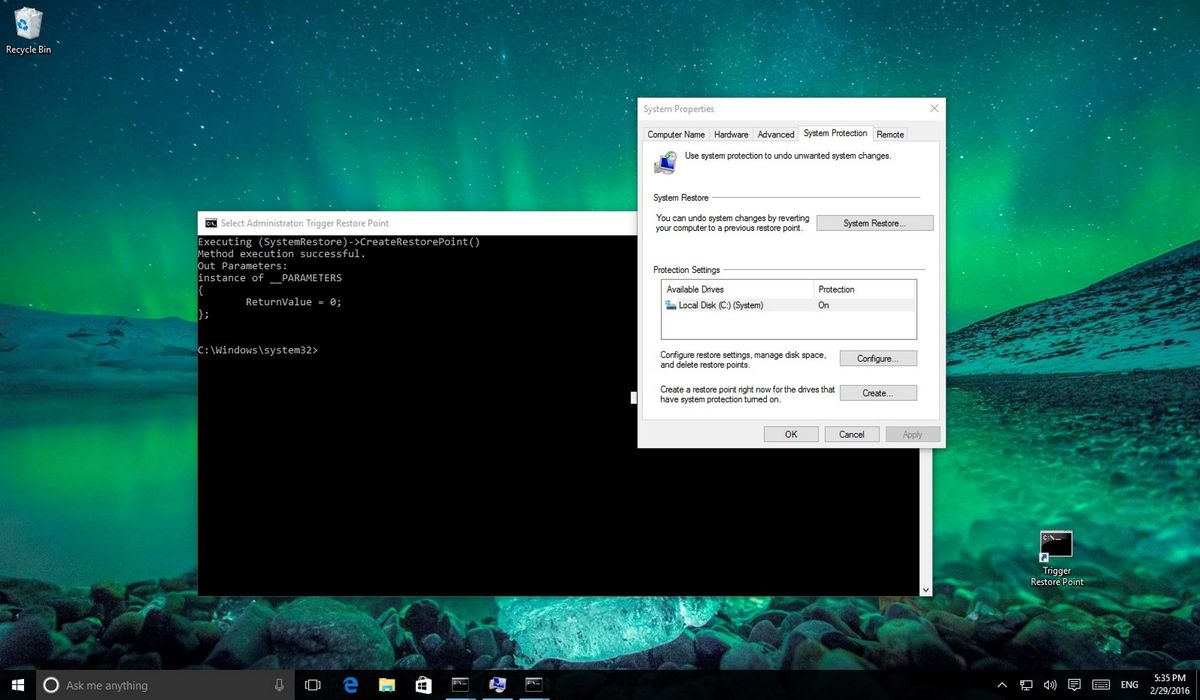
The manual creation process takes several minutes depending on your system size and the amount of data being captured. Windows compresses the snapshot data to minimize storage requirements, but restore points still consume significant disk space over time. The system automatically manages older restore points, deleting them when disk space becomes limited.
How System Restore Protects During PC Optimization
PC optimization tools like QwikTwik make various system modifications to improve performance, from registry tweaks to service configurations. These changes, while beneficial, can occasionally conflict with specific hardware configurations or installed software. Restore points provide a reliable path back to your previous working configuration if any optimization causes unexpected behavior.
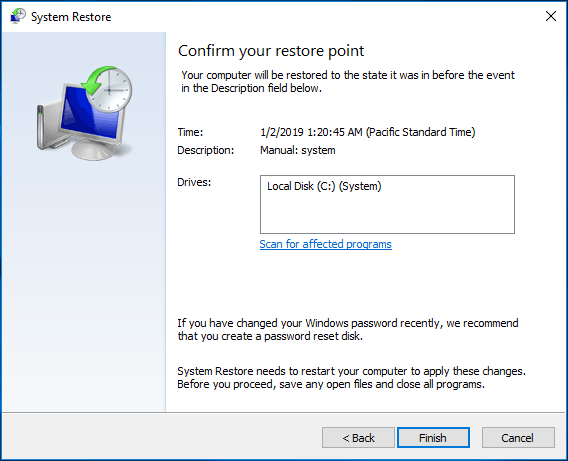
The restore process reverses system-level changes made after the restore point creation. This includes undoing registry modifications, restoring previous service settings, and rolling back driver updates. However, the restoration preserves files created after the restore point, protecting your work while fixing system issues.
Name your manual restore points descriptively, such as 'Before QwikTwik optimization' or 'Pre-registry tweaks' to easily identify the right recovery option later.
Storage Requirements and Management
Restore points consume disk space proportional to the number of system changes since the last snapshot. A typical restore point ranges from 300MB to several gigabytes, depending on your system size and installed software. Windows allocates a percentage of each drive for System Restore data, automatically managing this space as needed.
The system maintains multiple restore points simultaneously, keeping recent snapshots while removing older ones when space becomes limited. This automatic management ensures you always have recent recovery options without manually monitoring disk usage. However, you can adjust the allocated space through System Properties if needed.
Limitations and Considerations
System Restore has important limitations that affect its effectiveness as a safety net. The feature cannot recover from hardware failures, complete system crashes, or malware infections that disable the restore mechanism. Additionally, some system changes, particularly those made by certain security software or low-level system tools, may not be fully reversible through restore points.
Restore points also have time limitations. Windows automatically deletes older restore points to manage disk space, typically keeping points for 30-90 days depending on available storage. This means you cannot restore to very old system configurations, making recent restore point creation before changes even more important.
Best Practices for PC Tweaking Safety
Successful PC optimization requires a systematic approach to safety. Create restore points immediately before making any system changes, even minor ones. Document the specific changes you plan to make, so you can identify which modifications caused problems if issues arise. Test system stability after each major change rather than making multiple modifications simultaneously.
- Create a restore point before any system modifications
- Document planned changes and their purposes
- Make one change at a time when possible
- Test system stability after each modification
- Keep restore points for at least one week after changes
Consider creating multiple restore points during extended optimization sessions. If you plan several hours of tweaking, create intermediate restore points after successful changes. This approach provides more granular recovery options and reduces the amount of work lost if problems occur.
Does your PC automatically make restore points?
Yes, Windows automatically creates restore points before installing updates, drivers, or MSI-based software. However, manual creation before PC tweaks provides better control and more recent recovery options.
How long do restore points last on Windows?
Restore points typically last 30-90 days depending on available disk space. Windows automatically deletes older restore points when storage becomes limited, prioritizing recent snapshots.
Can restore points fix all PC problems?
No, restore points cannot fix hardware failures, complete system crashes, or recover personal files. They specifically restore system configurations and installed software to previous states.
How much disk space do restore points use?
Restore points typically use 300MB to several gigabytes each, depending on system size and changes. Windows allocates a percentage of drive space for System Restore and manages it automatically.